Concurrency vs Parallelism: What’s the Difference?
Table of contents
- The Core Distinction
- The Python GIL: History and Removal
- Why Python Makes This Interesting
- Concurrency with
asyncio - Concurrency with Threading
- Parallelism with
multiprocessing - The Wrong Tool Problem
- When to Use What
- Mixing Both:
asyncio+ProcessPoolExecutor - Quick Mental Model
These two terms are often used interchangeably, but they describe fundamentally different things. Confusing them leads to picking the wrong tool for the job — and performance bugs that are hard to diagnose.
The Core Distinction
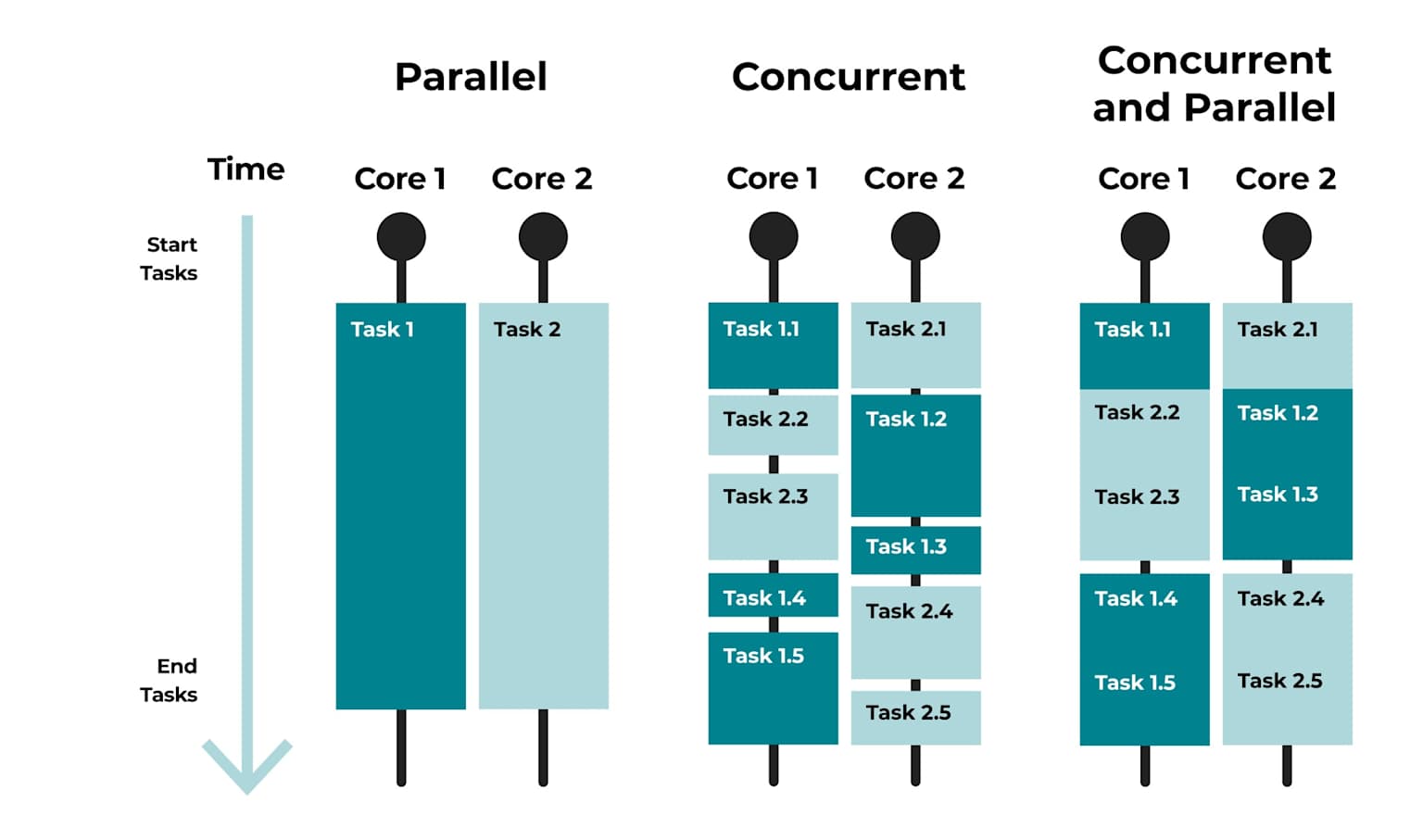
Concurrency is about dealing with many things at once. It’s a structural property of a program: tasks are broken up so that progress on multiple tasks can be interleaved. Only one thing may actually be running at any given instant.
Parallelism is about doing many things at once. It requires multiple CPU cores (or machines) and means that multiple computations are literally executing at the same time.
A useful analogy: a single barista handling three coffee orders by alternating between them is concurrent. Three baristas each making one order simultaneously is parallel.
The timeline diagram below makes this concrete — notice how concurrent tasks interleave on a single timeline, while parallel tasks run side by side simultaneously:
The Python GIL: History and Removal
To understand Python’s concurrency model, you need to understand the Global Interpreter Lock (GIL) — one of the most discussed and debated features in the language’s history.
What Was the GIL?
The GIL is a mutex (a mutual exclusion lock) that protects access to Python objects, preventing multiple threads from executing Python bytecode simultaneously. It was introduced in CPython (the reference Python implementation) in the early 1990s as a pragmatic solution to a hard problem: making memory management thread-safe without the complexity of fine-grained locking on every individual object.
In practice, the GIL meant:
- Only one thread could hold the interpreter lock and run Python code at any given moment.
- Threads would take turns — the GIL would be released periodically (or when waiting on I/O) to let another thread run.
- For I/O-bound tasks, this was largely fine: threads spent most of their time waiting, not executing bytecode.
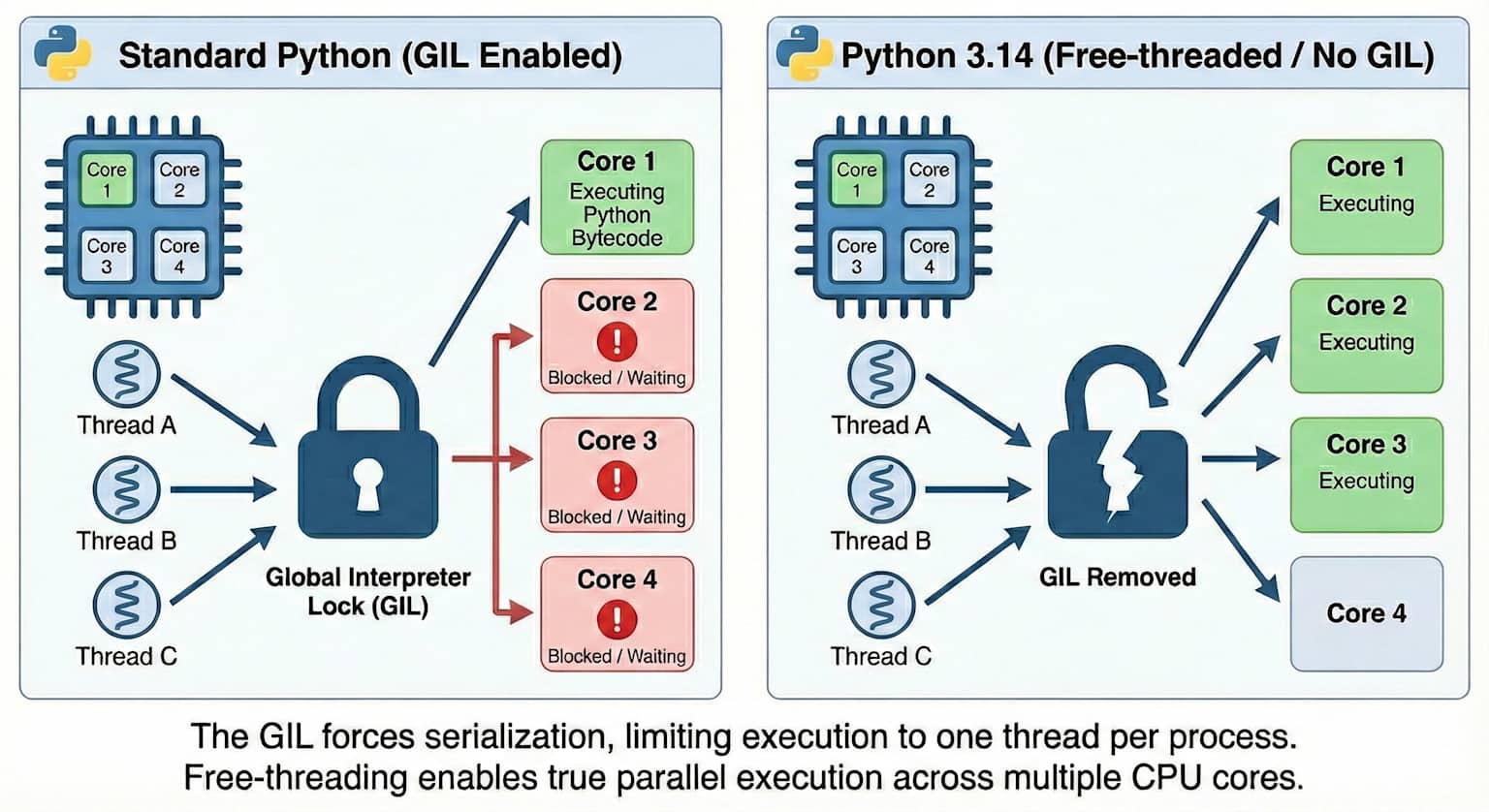
- For CPU-bound tasks, this was a serious limitation: multiple threads on a multi-core machine would not run in parallel. You’d get concurrency (interleaving), but not parallelism (simultaneous execution).
The diagram below illustrates this clearly — with the GIL, threads compete for a single lock and cannot truly run in parallel on multiple cores:
Why Was It Hard to Remove?
Removing the GIL was discussed for decades but resisted because:
- CPython’s memory management (reference counting) relied on the GIL for thread safety. Without it, every reference count increment/decrement would need its own lock — a major performance regression for single-threaded code.
- Many C extensions were written assuming the GIL existed, making removal a breaking change for the ecosystem.
- Attempts like Jython and PyPy showed that removing the GIL was possible but came with trade-offs.
Python 3.13+ and the Free-Threaded Build
Starting with Python 3.13 (released October 2024), CPython ships an experimental free-threaded build (also called “no-GIL” mode), enabled via a compile flag. Python 3.14 continues this work, making the free-threaded build more stable and performant.
In free-threaded Python, threads can truly run in parallel on multiple cores for CPU-bound work — without needing multiprocessing. This is a fundamental shift in the language’s concurrency model, though the standard GIL-enabled build remains the default for now while the ecosystem adapts.
For most production code today, the guidance in this post still applies: use multiprocessing for CPU-bound parallelism. But watch this space — free-threaded Python is rapidly maturing.
Why Python Makes This Interesting
Python’s Global Interpreter Lock (GIL) prevents more than one thread from executing Python bytecode at the same time. This means:
- Threading in Python gives you concurrency, but not true parallelism (for CPU-bound work).
asynciogives you concurrency via cooperative multitasking — but still single-threaded.multiprocessingbypasses the GIL by spawning separate processes, giving you true parallelism.
Concurrency with asyncio
asyncio is ideal for I/O-bound tasks: network calls, file reads, database queries. The event loop switches between tasks whenever one is waiting.
import asyncio
import time

async def fetch_data(name: str, delay: float) -> str:
    print(f"[{name}] Starting fetch...")
    await asyncio.sleep(delay)  # Simulates a network call
    print(f"[{name}] Done after {delay}s")
    return f"{name} result"

async def main():
    start = time.perf_counter()

    # Run all three concurrently — total time ≈ max(delay), not sum
    results = await asyncio.gather(
        fetch_data("Task A", 1.0),
        fetch_data("Task B", 2.0),
        fetch_data("Task C", 1.5),
    )

    elapsed = time.perf_counter() - start
    print(f"\nAll done in {elapsed:.2f}s")
    print(results)

asyncio.run(main())
Output:
[Task A] Starting fetch...
[Task B] Starting fetch...
[Task C] Starting fetch...
[Task A] Done after 1.0s
[Task C] Done after 1.5s
[Task B] Done after 2.0s

All done in 2.01s
['Task A result', 'Task B result', 'Task C result']
Notice: all three tasks started immediately. The total time is about 2 seconds (the longest task), not 4.5 seconds (the sum). That’s concurrency at work — the event loop doesn’t sit idle while one task waits.
Concurrency with Threading
Threading also provides concurrency and is useful when your code calls blocking I/O APIs that aren’t async-compatible.
import threading
import time

def worker(name: str, delay: float):
    print(f"[{name}] Starting...")
    time.sleep(delay)
    print(f"[{name}] Done after {delay}s")

threads = [
    threading.Thread(target=worker, args=("Thread A", 1.0)),
    threading.Thread(target=worker, args=("Thread B", 2.0)),
    threading.Thread(target=worker, args=("Thread C", 1.5)),
]

start = time.perf_counter()
for t in threads:
    t.start()
for t in threads:
    t.join()

print(f"All done in {time.perf_counter() - start:.2f}s")
This works well for I/O-bound tasks. But due to the GIL, if you replace time.sleep() with CPU-heavy work, you won’t get a real speedup.
Parallelism with multiprocessing
For CPU-bound tasks — image processing, heavy numerical work, simulations, ML preprocessing — you need real parallelism. Each worker process gets its own interpreter and GIL.
import multiprocessing
import time

def cpu_heavy(n: int) -> int:
    total = 0
    for i in range(n):
        total += i * i
    return total

if __name__ == "__main__":
    numbers = [10_000_000] * 4

    start = time.perf_counter()
    sequential_results = [cpu_heavy(n) for n in numbers]
    seq_time = time.perf_counter() - start
    print(f"Sequential: {seq_time:.2f}s")

    start = time.perf_counter()
    with multiprocessing.Pool() as pool:
        parallel_results = pool.map(cpu_heavy, numbers)
    par_time = time.perf_counter() - start
    print(f"Parallel:   {par_time:.2f}s")

    print(f"Speedup:    {seq_time / par_time:.1f}x")
On a 4-core machine, you’d expect roughly a 4x speedup. The processes literally run simultaneously on different cores.
The Wrong Tool Problem
This is where things go wrong in practice. Consider a CPU-heavy loop:
import threading
import time

def crunch(n: int):
    total = 0
    for i in range(n):
        total += i

start = time.perf_counter()
threads = [threading.Thread(target=crunch, args=(5_000_000,)) for _ in range(4)]
for t in threads: t.start()
for t in threads: t.join()
print(f"Threaded (CPU-bound): {time.perf_counter() - start:.2f}s")

start = time.perf_counter()
for _ in range(4): crunch(5_000_000)
print(f"Sequential:           {time.perf_counter() - start:.2f}s")
You’ll find the threaded version is no faster than sequential — and may even be slightly slower due to thread-switching overhead. The GIL is the culprit. Switch to multiprocessing.Pool and you’ll see the real speedup.
When to Use What
| Scenario | Best Tool | Why |
|---|---|---|
| Many HTTP requests | asyncio | I/O-bound, event loop is efficient |
| Calling legacy blocking APIs | threading | Can’t use async, still I/O-bound |
| Image/video processing | multiprocessing | CPU-bound, needs real parallelism |
| ML model inference (batch) | multiprocessing or GPU | CPU/GPU-bound |
| Database queries (async driver) | asyncio | I/O-bound with async support |
| Mixing I/O + CPU | asyncio + ProcessPoolExecutor | Offload CPU to processes, keep I/O async |
Mixing Both: asyncio + ProcessPoolExecutor
Sometimes you need to do I/O and CPU-heavy work. Here’s the clean pattern:
import asyncio
from concurrent.futures import ProcessPoolExecutor

def cpu_task(n: int) -> int:
    return sum(i * i for i in range(n))

async def main():
    loop = asyncio.get_event_loop()

    with ProcessPoolExecutor() as executor:
        futures = [
            loop.run_in_executor(executor, cpu_task, 5_000_000)
            for _ in range(4)
        ]
        results = await asyncio.gather(*futures)

    print(results)

asyncio.run(main())
The event loop stays responsive for I/O while CPU work is handled by a pool of real parallel processes.
Quick Mental Model
Ask yourself two questions:
- Is my bottleneck I/O or CPU?
- I/O (network, disk, DB) → concurrency is enough →
asyncioorthreading - CPU (computation, encoding, ML) → you need parallelism →
multiprocessing
- I/O (network, disk, DB) → concurrency is enough →
- Can I use
async/await?- Yes → prefer
asyncio(lower overhead than threads) - No (legacy blocking library) →
threading
- Yes → prefer
Concurrency keeps your program from sitting idle. Parallelism makes it faster by throwing more hardware at the problem. Both matter — just in different situations.