Why MCP Matters: Standardizing the Connector Problem
Table of contents
- What is MCP?
- The Architecture: Clients and Servers
- Why This is a Win for Developers
- How to Get Started
- Final Thoughts
- References
The biggest bottleneck in building useful AI agents isn’t just the model—it’s the data. If you want an agent to read your GitHub issues, search a SQLite database, or check your Google Calendar, you typically have to write custom integration code for every single tool and every single model provider.
This is the “Connector Problem,” and the Model Context Protocol (MCP) by Anthropic aims to solve it.
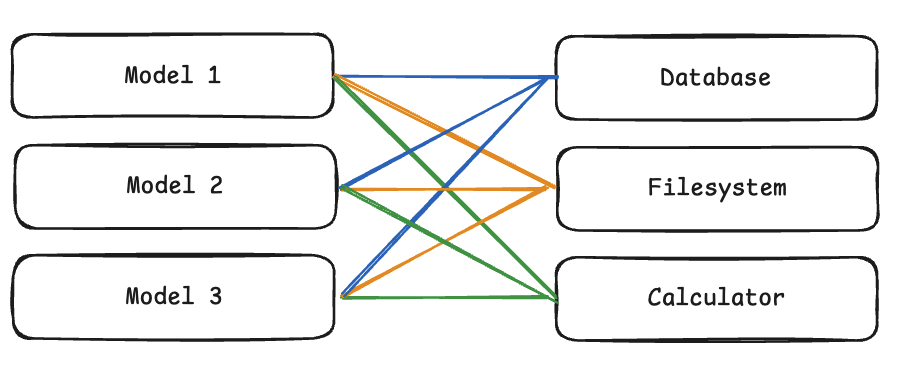 Figure 1: The complex “spaghetti” of custom integrations (M applications × N tools).
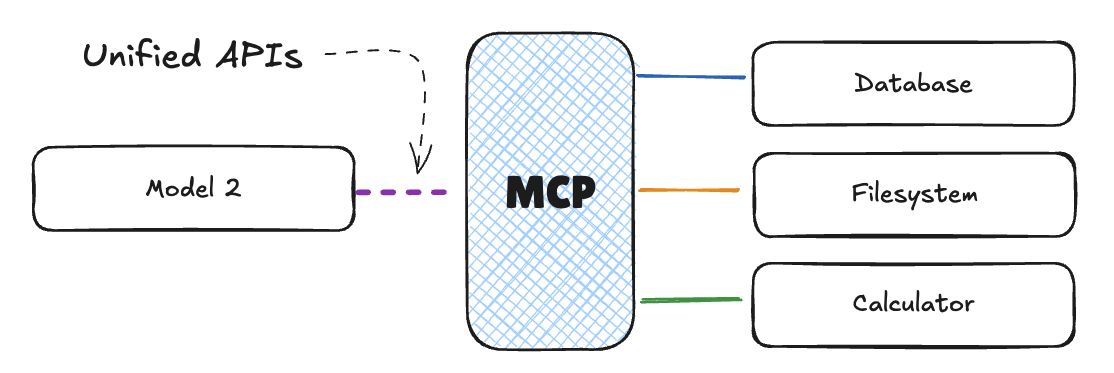 Figure 2: MCP standardizes the interface, reducing complexity to M+N.
What is MCP?
MCP is an open standard that decouples where your data lives from how the model accesses it. Instead of building a custom “Slack-to-Claude” or “GitHub-to-GPT-4” bridge, you build an MCP Server. Any MCP Client (like Claude Desktop or a custom-built agent) can then connect to that server and use the tools and data it exposes.
It’s essentially HTTP for LLM context.
The Architecture: Clients and Servers
The protocol follows a simple client-server model:
 Figure 3: The architectural relationship between the Host, Client, and Server.
- MCP Server: A small service that exposes specific capabilities (e.g., “search my local files” or “query Jira”).
- MCP Client: The environment where the LLM lives (e.g., your IDE, a CLI tool, or a web app).
- The Protocol: A standardized way for the client to ask the server “What tools do you have?” and “Run this tool with these arguments.”
Why This is a Win for Developers
Before MCP, if you wrote a cool tool that lets an LLM interact with a specialized data science library, it only worked in the specific app you built. With MCP, you write the server once, and it instantly works across any IDE or agentic environment that supports the protocol.
- Portability: Write your tool logic once.
- Security: You control the server. You decide exactly what files or API endpoints the agent can touch.
- Local-First: Many MCP servers run locally on your machine, keeping sensitive data out of the model provider’s cloud until it’s actually needed for the prompt.
How to Get Started
The easiest way to see MCP in action is to use the Claude Desktop app. You can add a pre-built server (like the SQLite or Google Drive servers) to your claude_desktop_config.json and immediately start asking Claude questions about your local data.
If you’re a developer, the Python and TypeScript SDKs make it easy to wrap your existing APIs into an MCP server.
# A conceptual snippet of an MCP server in Python
from mcp.server.fastmcp import FastMCP

mcp = FastMCP("My Local Tool")

@mcp.tool()
def get_system_status() -> str:
    """Returns the current status of the local server."""
    return "All systems go."

if __name__ == "__main__":
    mcp.run()
Final Thoughts
MCP is a boring but necessary piece of infrastructure. By standardizing how models interact with the world, it moves us away from “walled garden” integrations and toward a more open, interoperable agent ecosystem. It’s less about the magic of the AI and more about the plumbing that makes that magic useful in a real dev workflow.